Minecraft Update 1.9: Snapshot 15w49a, 15w49b Deliver Small Tweaks And More Bug Fixes
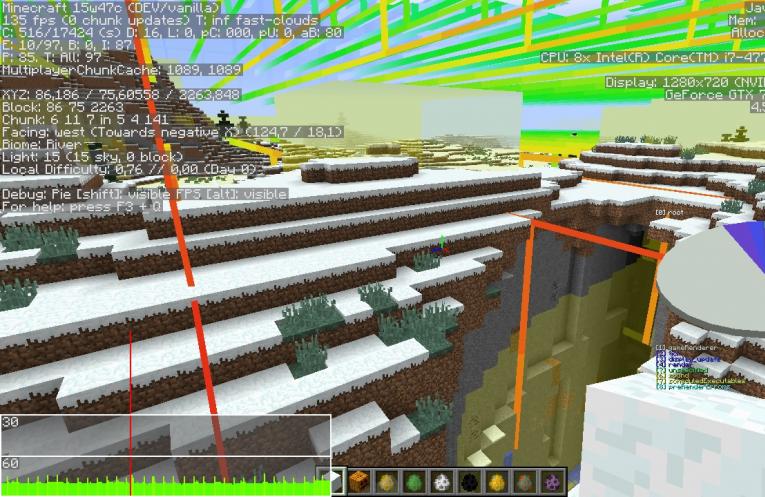
A pair of new Minecraft Update 1.9 preview builds debuted this week, two weeks after the community’s last preview of the next Minecraft patch, but there isn’t all that much to get excited about in this week’s previews of Minecraft Update 1.9.
It’s been a few months, since the last time a week passed without a new preview of Minecraft Update 1.9. Thankfully, following last week’s lull in the release cycle, Mojang has returned with a pair of new Minecraft snapshots this week. Neither of this week’s preview builds consists of much more than bug fixes for issues from recent Minecraft snapshot; a fact that shouldn’t exactly come as a shock, given that Mojang is in the final stretch of its work on Minecraft Update 1.9. But fans might be happy to hear there are a handful of other gameplay tweaks in Minecraft snapshot 15w49a, too.
The first Minecraft Update 1.9 preview build of the week improves the game’s handling of thrown items, converting snowballs and thrown potions back into items if/when they become lodged in cobwebs. The first Minecraft snapshot of the week also improves door functionality, giving players a bit more control over the object’s orientation when placed. Minecraft snapshot 15w49a even features a small tweak for horses, which allows them to rotate with the player going forward.
Here are the complete patch notes for Minecraft snapshot 15w49a, via Jens Bergensten:
- Snowballs and thrown potions now turn into items when stuck in cobwebs – via
- Horses now rotate with the player
- Improved doors
- They are now placed facing left/right depending on which half of the block you click on, unless neighboring doors cause them to place a certain way -via
- Improved path finding
- Balancing tweaks
- A small feature
- stat.aviateOneCm – via
- MCPE derpy snow golems
- Shear normal snow golems to take their pumpkin
- Changed the /particle command
- Added a params parameter to specify particle parameters (for iconcrack_, …)
- Added a player parameter
- /playsound now supports tab-completion
- Server-known sounds are now tab-completed
- Sweep attacks now do one heart of damage
- Zombies, Zombie Pigmen, Slimes, Magma Cubes, Wither Skeletons, Spiders, Cave Spiders, Silverfishes and Endermites now fight back when hit by other mobs
- Texture changes
- Melons and glistering melons are now oriented the same way
- Health Boost and Absorption now have different icons – Screenshot
- Increased elytra wall damage
- Fixed some bugs
- Fixed items placed into beacons being lost when reloading the world – you can no longer place more than one item in a beacon, hoppers/droppers no longer feed into beacons, you drop the payment item when closing the beacon UI again
- Fixed signs, sugar canes, vines, two block high plants and cobwebs causing glitchy mob behavior
- Fixed clearing the nausea effect showing portal tint
- Fixed projectiles behavior in regard to non-solid blocks: They now ignore non-solid blocks and get “stuck” in cobwebs
- Fixed command selectors with decimals creating fake scoreboard players instead of simply failing
- Fixed players floating above saddled donkeys/mules
- Fixed lightning strikes destroying item frames, paintings, and armor stands
- Fixed endermen being able to pick up blocks behind walls
- Fixed overworld lava flowing towards unreachable drops
- Fixed undead mobs staying in shadows even while wearing stuff on their heads
- Fixed the rain texture being rendered upside down
- Fixed crop hitboxes not adjusting for growth height
- Fixed being unable to put flower pots on pistons
- Fixed blaze fireballs damaging other blazes
- Fixed tamed wolves attacking when wild wolves are hurt
- Fixed being able to place cacti under water
- Fixed trapped chests being listed under “Decoration Blocks” instead of “Redstone”
- Fixed ocelots and rabbits running from players in creative mode
- Fixed clicking on non-existing link target or deleted screenshots giving an error
- Fixed being unable to pick block on the dragon egg
- Fixed teleporting with relative x rotation above 90 affecting y rotation
- Fixed guardian beams turning green at the end of charging
- Fixed lit furnaces still being obtainable using the /give command
- Fixed multiple item textures have partially transparent pixels, causing their item models to have holes
- Fixed the shift+F3 menu remaining on server disconnect
- Fixed server resource packs not staying persistent – more info
- Fixed offhand items rendering while drawing bow (1st and 3rd person view)
- Fixed shulkers deflecting arrows from the side but not the top/arrows being glitchy when shot at the edge
- Fixed punching cake consuming one slice
- Bosses are unaffected by potion effects/tipped arrows: The Wither and the Ender Dragon will now ignore all effects
- Fixed the Infinity enchant working with tipped arrows
- Fixed levitation not affecting squids
- Fixed shulkers teleporting into other shulkers
- Fixed end cities spawning even without Generate Structures
- Fixed dead shulkers teleporting
- Fixed cauldrons getting filled with water while snowing in biomes where it only snows above a certain height
- Fixed shulkers opening into blocks
- Fixed blocks/items on mobs’ heads turning red when the mob takes damage
- Fixed pistons pushing AreaEffectClouds
- Fixed leading zeroes being omitted on dyed leather armor colour
- Fixed the drop item scoreboard objective increasing with /give
- Fixed shulker floating slightly above ground
- Fixed setblocking signs with at least one, but not all 4 lines specified putting “null” on empty lines when reloading the world: It now only accepts proper json for each line and each line has to exist, empty sign otherwise
- Fixed the librarian zombie villager robe texture sometimes being white instead of transparent, sometimes being transparent
- Fixed the shulker hitbox height while peeking
- Fixed levitating slimes moving
- Fixed slimes always moving south first
- Fixed arrows blocked by shield getting stuck above the player
- Fixed shields still displaying metadata
- Fixed the chest armor slot for AttributeModifiers being called “torso” when all other slots were consistent with their /replaceitem names
- Fixed AreaEffectCloud not working with some particles, crashing with others
- Fixed end portals generated with 12 eyes not being activated
- Fixed elytra going invisible on invisible players
- Fixed taking damage while gliding pushing you upwards
- Fixed picking block on frosted ice giving a warning
- Fixed loot table exceptions not being caught
- Fixed rain putting out fires too seldomly
- Fixed being unable to remove container minecarts with invalid loot table
- Fixed being able to place multiple end crystals in the same place
- Fixed an issue with level.dat causing the end dragon fight to fail
- Fixed villagers still not going through doors
- Fixed skeletons riding horses being unable to reach their pathfinding goal/not attacking properly
- Fixed the “Block Broken” subtitle being inaccurate
- Fixed beams from end crystals moving in the wrong direction when spawning Ender Dragon
- Fixed a mob pathing issue
- Fixed Activator Rails and Powered Rails powering each other
- Fixed some subtitles being unrelated to the sound
- Fixed slimes being slightly offset from their actual position
- Fixed silent Shulkers still producing sounds
- Fixed some of the new textures not being compressed properly
- Fixed texture variants switching on nearby block updates
- Fixed the level-up sound originating at a position in the world, not at the player position
- Fixed the baby zombie hitbox being too big, causing floating mob heads and floating Grumm/Dinnerbone baby zombies
- Fixed frost walker not working from transparent blocks
- Fixed right clicking a hoe/shovel on grass/dirt playing the wrong sound
- Fixed each cuboid part of a model rendering smooth lighting as if it were a full block, causing lighting issues on corner stairs and custom models
- Fixed NBT data for SmallFireballs being incomplete
- Fixed server-side resource packs not showing up in the resource pack list
- Fixed being unable to place blocks in marker armor stands
- Fixed zombie/skeleton/zombie pigman arms going up and down if they can’t reach you
- Fixed the enderdragon getting in boats
- Fixed villagers killed by zombies turning into baby zombie villagers/chicken jockeys
- Fixed creepers sometimes dropping gunpowder when their explosion sets off and end crystal
- Fixed being able to place end crystals inside blocks, replacing them with fire in the end
- Fixed the dragon respawn sequence not stopping when /killing the dragon
- Fixed the beam target of end crystals on obsidian pillars not updating when the ender dragon spawn sequence is stopped
- Fixed the end crystal beam appearing detached as the crystal bobs up and down
- Fixed end crystals overlapping when interrupting the dragon rebirth sequence
And here are the patch notes for Minecraft snapshot 15w49b:
- Fixed some bugs
- Fixed the bottom of falling sand turning black when remaining space is < 1 block
- Fixed mobs entering a cauldron never leaving the cauldron
- Fixed a crash when depleting an item stack
- Fixed a crash in worlds with double-slab blocks
- Fixed Falling Sand entities being invisible/rendering at 0,0
- Fixed the time query daytimecommand not resetting after day night cycle
- Fixed stat.openInventory whilst riding horse
- Fixed armor stands being able to have potion effects
- Fixed the End Portal teleport range being too large
Be sure to check back with iDigitalTimes.com and follow Scott on Twitter for more Minecraft coverage throughout the rest of 2015 and for as long as Mojang supports Minecraft in the years ahead.
Minecraft Update 1.9: Snapshot 15w49a, 15w49b Deliver Small Tweaks And More Bug Fixes