Students at Maraekakaho School have been using two popular children’s pastimes to help their community become more prepared for an emergency.
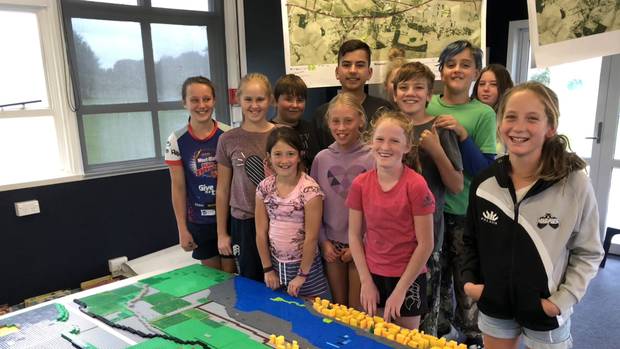
The students have been using online video game Minecraft and Lego building blocks to map their community; locating its hazards, vulnerabilities and resources that could be useful in an emergency.
This is part of a research project to trial the use of these two popular pastimes for disaster risk reduction and explore if these are effective tools for children to use.
Researchers from the University of Auckland, Auckland University of Technology (AUT) and East Coast LAB (Life at the Boundary) developed a series of lessons and activities for the students to learn more about natural hazards, vulnerabilities and resources.
Year 6 student Raiha said they had started off in the classroom “mapping our hazards and resources on really big maps using lots of stickers, pins, and string”.
The students were then divided into groups to build their maps using Minecraft and more than 10,000 Lego blocks.
“I really enjoyed playing on Minecraft to build the map of our school and learning about the hazards that have affected us in the past,” Year 5 student Jodi said.
A group of 12 students have been documenting the process on video. It will be released online once the project has been completed.
Researchers are also working with other members of the community to help develop a Community Resilience Plan with the Hawke’s Bay Civil Defence emergency management group.
This is part of a two-year research project funded by the Resilience to Nature’s Challenge strand of the National Science Challenge.
For more information visit: www.eastcoastlab.org.nz/our-science/our-projects/participatory-technology/
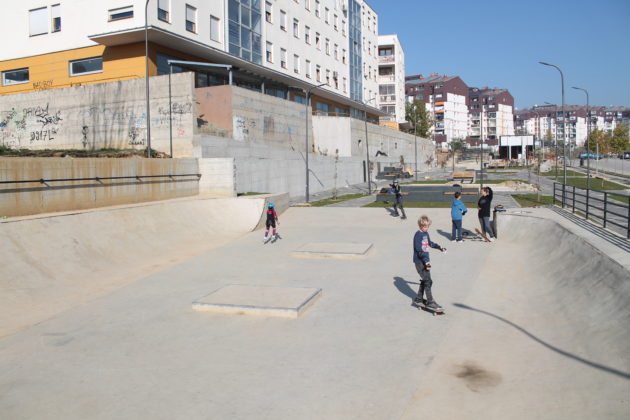
Where there was once a derelict market in the Sunny Hill neighborhood of Pristina, Kosovo’s capital, now sits a skate park. Rollerblades, skateboards, and BMX bikes make a constant clatter as kids and teens roll up and down the half-pipes, quarter-pipes, and ramps. The popular public space is very much a brick-and-mortar endeavor, but it owes its existence to Minecraft, whose parent company was bought by Microsoft in 2014. In the process, the Redmond, Wash., company absorbed an innovative social project involving the United Nations.
The $2.5-billion acquisition made waves in the video game industry as Microsoft moved in to scoop up the immensely popular world-building platform from Swedish company Mojang. Despite initial fears in the rabid Minecraft community, the game continued to grow in popularity and spun off a deeply discounted education version for schools.
The pedagogical potential is precisely what captured the attention of Deirdre Quarnstrom, who was intimately involved with the acquisition as chief of staff to Phil Spencer, the head of Microsoft Xbox. She is now the general manager of Minecraft Education, and an early booster of one of Mojang’s Minecraft side projects: Block by Block.
Deirdre Quarnstrom, Director of Minecraft: Education Edition demonstrates the new Code Builder feature at the Microsoft Education event at Center 415 on Tuesday, May 2, 2017, in New York. (Andrew Kelly/AP Images for Microsoft)
The $2.5-billion acquisition made waves in the video game industry as Microsoft moved in to scoop up the immensely popular world-building platform from Swedish company Mojang. Despite initial fearsin the rabid Minecraft community, the game continued to grow in popularity and spun off a deeply discounted education versionfor schools.
“It’s somewhat unique in the gaming industry to have a very popular videogame reaching outside the entertainment space and being involved in things like urban planning,” she told GeekWire.
In 2012, before the acquisition, a Swedish architect and the parent of a Minecraft devotee came to Mojang with an idea. What if Minecraft, with its digital Lego-like tools making for easy mock ups of buildings, were used in an urban design workshop with everyday people? Architect software like Google Sketchup or AutoCAD is far too sophisticated for laypeople, but they are the ones whose input urban planners are always seeking when it comes to new designs for infrastructure, whether a new mass transit station or a proposed public park.
Minecraft-as-civic-participation went so well in Sweden that the architect brokered an introduction between Mojang and UN-Habitat, the United Nations lead agency for cities. The result was a memorandum of understanding whereby Mojang would help UN-Habitat deploy Minecraft in cities where the agency was coordinating the renovation or creation of public spaces. They called it Block by Block.
“We were amazed that people were interested in using a video game for something that felt so serious,” Mojang COO Vu Bui told GeekWire.
“In project after project I am amazed how quickly people can learn the tool and start expressing themselves,” UN-Habitat’s Pontus Westerberg told GeekWire. “Even people with no previous computer experience can pick it up in half a day or less. We’ve worked with people from slums all over the world. It’s a great empowering experience for them.”
While anyone can learn Minecraft — the team was impressed that older Haitian men redesigned their fishing docks with no prior computer experience — tech-savvy youth have a natural advantage. That gives them a more powerful voice compared to traditional public input processes. “If we have a couple of teens paired with adults in their 30s or 40s, usually the one sitting at the keyboard holding the mouse is one of the young ones,” Bui explained.
He recalled one of the Haiti projects as particularly empowering for young women, where teenage girls stood up at the public meeting to defend their proposal. “We push that their must be youth and equal gender representation,” Bui said. “We don’t want our workshops to be middle-aged men.”
Once Microsoft took over, the tech giant shepherded the ad-hoc arrangement between Mojang and UN-Habitat into a formally incorporated 501(c)3 non-profit, the Block by Block Foundation. Both Quarnstrom and Bui sit on the board of the foundation, which now operates with a roughly $2 million annual budget funded by royalties from Minecraft merchandise sales, settlements from Minecraft licensing disputes, and individual donations — Microsoft employees chief among them.
Quarnstrom is a hands-on board member, visiting sites around the world, including the Pristina skatepark, to personally vet projects before signing off on the roughly $100,000 that Block by Block contributes in licenses and funds for consultants to run the public meetings.
In Anaheim, she watched the children of immigrant workers build a vision for a neighborhood park in two hours. In Hanoi, she listened to teenage girls articulate a vision for better lighting on their route to school.
“It’s pretty eye-opening to the architects, landscape architects, and city planners to see how valuable and enthusiastic the input is from the community,” she said. “Even in the developed world when running a public input process, it’s hard to make the connection with blueprints, but when you provide them with a 3D virtual model of the space [the audience] becomes much more engaged.”
The journey from the virtual world to the real world sometimes leaves Quarnstrom bewildered at Minecraft’s versatility. “Sometimes it feels a little surreal to me when I’m on the phone with three or four city planners as the representative of a video game,” she said. “But it’s because the game does have an impact.”
Kids who have never experienced the online gaming platform Minecraft can apply for a free summer camp called Minecraft 101. The camp, which will be held at Montana State University, is for youth who will enter grades 4 through 7 this fall.
Minecraft is known as a fun and interactive platform that increases creativity, critical thinking and problem-solving skills. Students will be led through hands-on design challenges that allow them to practice spatial skills while they craft their own online worlds and explore science, technology, engineering and math.
Minecraft 101 is free for accepted applicants. However, no travel funds or overnight lodging is provided. The camp lasts from 9 a.m. to 4 p.m. on two consecutive days.
Two identical sessions will be offered on Aug. 14-15 and Aug. 16-17. Students can indicate which session is better, but instructors cannot guarantee placement in a specific session.
The camp is hosted by the MSU departments of education, electrical and computer engineering, and physics; and the Montana Engineering Education Research Center (MEERC), with funding from the National Science Foundation. To download an application, visit MSU Academic Technology and Outreach at ato.montana.edu/minecraft. The deadline to apply is Friday, May 11.
For more information, contact Nicole Soll with MSU Continuing, Professional and Lifelong Learning atNicole.soll1@montana.edu or 406-994-6550.
Whether it’s to copy an existing build, change the gamemode, or flat out cheat your way to glory, Minecraft console commands are an important part of playing the game day-to-day. While there are a lot of different commands out there, all varying in complexity, we’ve got a run down of the ones you need to know, and, of course, the ones you can use to troll your friends. Because what’s Minecraft without a bit of friendly griefing?
If you’re wondering how to enter the Minecraft console commands listed below, all you need to do is hit the forward-slash key (/) and that’ll bring up a small window. Input the code and hit enter and your command will activate.
Shorthand Codes
Below are the shorthand codes to save you from typing in different player names. These are worth memorising so you don’t have to type in names like “Sniper_Kitty_Bruv_91” every time some jobber joins your game.
The clone command
/clone <x1> <y1> <z1><x2> <y2> <z2><x> <y> <z>
Clones a selection of blocks to another location. Very helpful if you’re building a city space and want to duplicate multiple buildings to different areas. “<x1> <y1> <z1>” is your start point. “<x2> <y2> <z2>” is the end point. And “<x> <y> <z>” is where you want the cloned blocks to spawn.
Example: /clone 100 234 -10 200 100 0 300 200 100
How to change the difficulty
/difficulty <difficulty>
Changes the in-game difficulty. Replace the latter section of the code with one of the following:
Adds a status effect to the targeted player. “[seconds]”, “[amplifier]”, and “[hideParticles]” are all optional conditions, so feel free to ignore them unless you want to change the length, how strong the effect is, or whether the effect shows as particles or not. If you want to remove an effect from a player, type “/effect <player> clear”.
Example: /effect PCGamer water_breathing 30
Enchant an item
/enchant <player> <enchantment ID> [level]
Adds an enchantment to the item the player is holding. So that’s smite, bane of the arthropods, sharpness—any enchantment you’d pull from a book or enchant table. Here’s a list of Enchantment IDs.
Example: /enchant PCGamer minecraft:smite 1
Exp modifier
/xp <amount> [player]
Gives the targeted player an amount of experience points. If you just want to add levels instead, which is easier for enchanting, try “/xp <amount>L [player]”.
Example: /xp 100L PCGamer
Change the gamemode
/gamemode <mode>
Changes the gamemode for everyone in the session. Add a player’s name to the end of the code to alter the mode for different players. Replace “<mode>” with one of the following options:
Example: /gamemode Survival
Give an item or items
/give <player> <item> [amount]
Drops an item into the player’s inventory. Perfect for if you want to start a run with a full set of diamond gear. Just keep in mind the amount section only works for stackable items. You can’t give yourself 100 diamond swords in one go, as cool as that’d be. For a full list of item IDs, head here.
Example: /give PCGamer diamond_sword 1
Help if a command isn’t working
/help [command name]
Offers additional information about any console command. If you’re trying a command and it isn’t working as it should, type the above command before the name of the command that isn’t working and you’ll be treated to more details about how it works.
Example: /help kill
Turn keep inventory on
/gamerule keepInventory true
Changes the game rules so should you die, you keep all the items in your inventory. Replace “true” with “false” to turn it off again.
Kill everyone or everything
/kill
Kills everything, including the player. But should you want to kill another player, use “/kill <player>”. And to kill a certain type of mob, “/kill @e[type=mobType]”.
The play sound command
/playsound <sound> <player>
Plays a specific sound file. Great for if you want to use a command block to play a sound when someone opens a door. Who doesn’t love a good doorbell? Take a look at all the sound file names here.
Displays the seed for their current world should you wish to replay the seed again from scratch or pass it along to a mate.
Set the world spawn
/setworldspawn
Changes the world spawn to wherever the player is standing. If you don’t want to do that, you can also set it to a predetermined location with “/setworldspawn <x> <y> <z>”
Example: /setworldspawn 100 80 0
Stop time from changing
/gamerule doDaylightCycle false
This completely turns the daylight cycle off so it’ll always be the current time of day. To reenable the cycle, replace “false” with “true.”
Spawn a mob
/summon <entity_name> [x] [y] [z]
Summons a mob to a specific location. Remove the “[x] [y] [z]” section at the end to have the mob spawn right on top of you. Just remember if you’re spawning the Wither you’ll need to leg it as fast as possible.
Example: /summon creeper
Teleport
/tp [target player] <x> <y> <z>
Teleports the targeted player to a designated location. And yes, you can indeed teleport a friend into the sky and laugh as their body flails back down to earth.
Example: /tp PCGamer 100 0 10
Alter the in-game time
/time set <value>
Sets the in-game time. Add one of the following numbers onto the end to change the time of day to something else:
Change the weather to something nicer, or worse
/weather <clear/rain/thunder>
Changes the in-game weather to a different type. I.e. “/weather thunder” would start a thunderstorm. This one’s a must if you’re going after charged creepers. Nobody’s got time to sit around waiting for it to thunder.
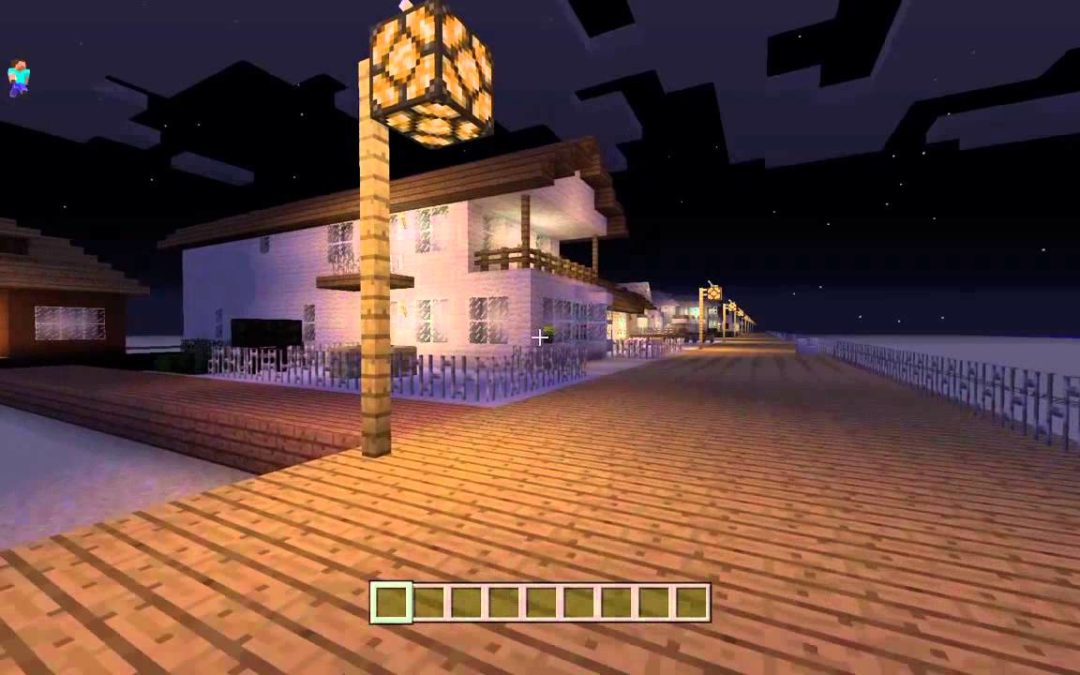
A former New Jersey man says that he missed the Jersey Shore so much that he spent years recreating the Point Pleasant Beach boardwalk using the video game “Minecraft.”
Kevin Domenic tells News 12 New Jersey that his family once owned a beach home in Point Pleasant Beach and that he has many happy childhood memories there. But he says that he moved away to Missouri to be closer to his wife’s family.
“[Point Pleasant Beach] is my favorite place in the world,” Domenic told News 12. “I thought, ‘Why not try to recreate it in ‘Minecraft?’’”
Domenic documents the process in a series of YouTube videos set to slow piano music. Even the smallest details, such as the color of pavers in some walkways, were copied.
New 12 New Jersey showed the recreation to some Jersey Shore residents, who said that they were impressed by the level of detail.
“The Jersey Shore has a huge impact on people from childhood,” says Point Pleasant Beach resident Lynn Krohn. “It’s a memory you have, being here, smelling the salt water and obviously it had a huge impact on him. I mean, this is incredible.”
Domenic even recreated the Minard Lane bungalow that his family once owned.
Thousands of “Minecraft” accounts were recently infected with malware that can potentially reformat hard drives and delete backup data and system programs, according to cybersecurity company Avast.
The malicious software is apparently distributed via “Minecraft” character skins created in the PNG file format and uploaded to the game’s official website by fans. Skins modify a player’s avatar and they’re quite popular. Avast estimates nearly 50,000 “Minecraft” accounts have been infected.
“The malicious code is largely unimpressive and can be found on sites that provide step-by-step instructions on how to create viruses with Notepad,” Avast said. “While it is fair to assume that those responsible are not professional cybercriminals, the bigger concern is why the infected skins could be legitimately uploaded to the ‘Minecraft’ website. With the malware hosted on the official ‘Minecraft’ domain, any detection triggered could be misinterpreted by users as a false positive.”
“Minecraft” is one of the biggest games in the world. It’s sold more than 144 million copies since its launch in 2009. Microsoft bought both the game and its developer, Mojang, for an estimated $2.5 billion in 2014. In a recent interview with PopSugar, Helen Chiang, the new head of “Minecraft” at Microsoft, said the sandbox game now has 74 million active players worldwide. This makes it a ripe target for hackers, but Avast said only a small percentage of the player base actively uploads modified skins, which has kept infection numbers low.
Avast said anyone who downloaded modified skins should run an antivirus scan. Some might need to reinstall the game or, in extreme cases, restore data on their hard drives. Infected users might also receive unusual messages in their inboxes with subjects like “You Are Nailed, Buy A New Computer This Is A Piece Of Sh*t,” “You have maxed your internet usage for a lifetime,” or “Your a** got glued.”
Avast said it contacted Mojang and they are working on fixing the vulnerability.