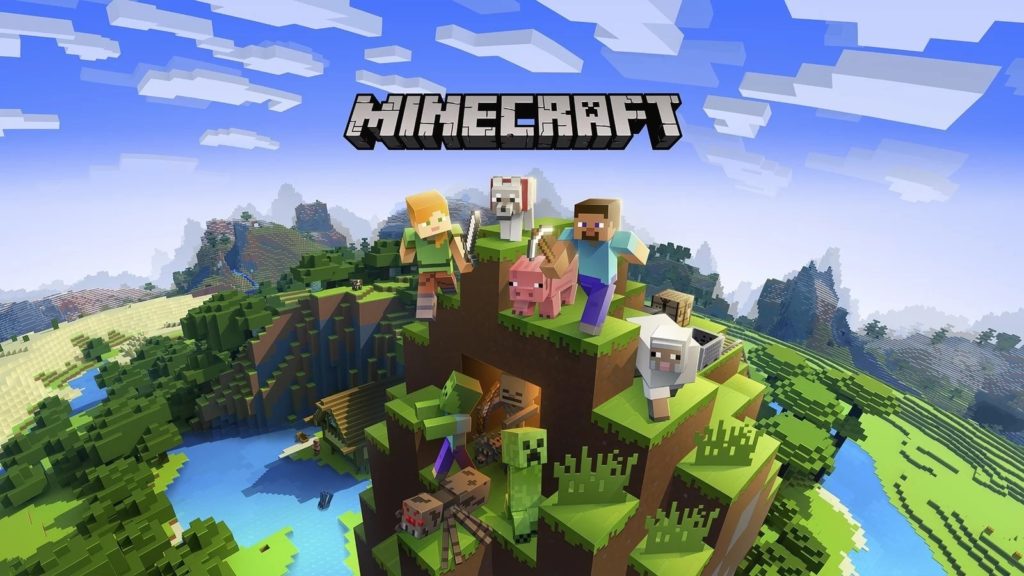
Servers are your gateway to expanding your horizons in Minecraft, and here we’ve rounded up the best Minecraft servers around. Like fantasy? Want to walk through a blocky recreation of your favourite TV show or film? Want to grief without the fear of a ban? If you answered ‘yes’ to any of the above, servers have got you covered.
Joining a server is nice and simple. All you need to do is load up Minecraft as you normally would, hit multiplayer, then add a server. Name it whatever you want, then type or Ctrl+V the IP address into the box below. Save it, click play, and you’re good to go. Just keep in mind some servers need you to download data for them to run correctly. If this at any point fails, just quit out and keep trying. It should work eventually.
Mineplex
This server is astoundingly large and packs in a vast array of things to do. They’ve got FPS games, painting, and even their own version of Smash Bros. Basically if you can think of a game type, there’s a large chance of it being available within Mineplex. It’s also got an incredibly active staff and as a result, suffers from a lot less grief than some of the less wholesome servers around.
IP Address: us.mineplex.com or eu.mineplex.com
Autcraft
Autcraft is a server designed specifically for children and adults who have autism. It’s designed to be a safe haven for those who want a reprieve from the potentially overwhelming things you would find on other servers. This includes things like no frightening characters and making sure everything is kept child-friendly. You have to apply in order to join the server, but if you make it in then you’re good to go. It’s not doing anything special in terms of how it plays, but it’s a useful one to know about if you or a family member have autism and would like to know there’s somewhere safe to go.
IP Address: mc.autcraft.com
WesterosCraft
Game of Thrones is over now, and whether you liked or loathed the ending, you’re probably hungry for more. Well, hunger no longer, and feast yourself on this server. While it’s not finished, it’s still going to provide a nice rush for those who want to try their hand at being King for a day. We’ve yet to see whether or not you can pet the Direwolves though…
IP Address: mc.westeroscraft.com
Pirate Craft
Sailing a ship around in Minecraft is tricky, but in Pirate Craft, they do a surprisingly good job of making it work. As is often the way these servers, it takes a bit of time to get used to things, but it’s well worth the effort if you like the idea. The scale of the ships is impressive, as is the ship-to-ship combat. Just don’t be surprised when someone nicks your pirate ship, there’s no honour among thieves.
IP Address: mc.piratemc.com
Hypixel
Hypixel is another mini-game heavy server. There are all the normal games you would expect from a high-quality server, but there are also a few noteworthy ones as well. Games like VampireZ, where you have to try and survive as a human while the vampires hunt you. There’s even a game called Turbo Kart Racers, which is a surprisingly good racing game that will pit you against other players as you try and reach the finish line first. It’s a lot of fun, and they update it regularly, so it’s worth sticking around for.
IP Address: mc.hypixel.net
The Lord of the Craft
While this may sound like a Lord of the Rings server, it’s not quite. It’s fantasy, sure, but with a huge focus on roleplaying. The world, and its lore, is already set up, and a helpful warp command means travelling between the different kingdoms (high elves, dark elves, dwarves, etc) is simple. All you need is a killer skin and an elaborate backstory and you’re good to go.
IP Address: mc.lotc.co
Grand Theft Minecart
You can probably guess from the title which popular video game series this server is based on. You guessed it, the unstoppable juggernaut that is Hello Kitty Online. Or GTA. It’s one of the two.
Join this server and you’ll be treated to two different game modes (Grand Theft Minecart and Vice Minecart), as well as 35 different GTA-inspired weapons. There are also plenty of vehicle offerings including cars, planes, and of course, tanks. Because it’s not GTA if there isn’t an option to go on an explodey murder-spree.
IP Address: mc-gtm.net
The Mining Dead
What’s the one thing missing from Minecraft? Guns! Although that’d just make it Fortnite, wouldn’t it? Either way, if you’re a fan of The Walking Dead TV show or comic, this is a great opportunity to take in all the famous sights as you’re scrambling to find weapons, ammo, and generally anything to help fend off the undead. And because of the voxel stylings of Minecraft, there’s a faint whiff of Goldeneye 64 to the whole thing.
IP Address: hub.havocmc.net
Arkham Network
Fancy donning a cape while shouting “You have failed this city!”? Maybe you’re an anarchist looking to watch the world burn? Whichever side you choose to join, the Arkham Network has a comic-book world that’s just begging to be explored. And griefed, obviously. There are also a host of different day jobs for making coin, and a wealth of gamemodes to participate in. One of the key rules of this server is make friends, fast. You’ll need them.
IP Address: mc.arkhamnetwork.org
Pokefind
Arguably one of the best Pokémon/Minecraft mashups out there, Pokefind starts as you’d expect. You meet a professor before being tasked with choosing a Pokémon. The starter choice options mirrors that of Generation 1, so that’s Charmander, Bulbasaur, and Squirtle. Once you’ve picked Bulbasaur (because you absolutely should!), you can either chill at the Pokémon centre, learn about crafting, or head into the wild and fight some poor animals. It’s just like the actual games, then.
IP Address: Play.pokefind.co
MC Middle Earth
A team was always going to attempt to recreate the Lord of the Rings universe in Minecraft, and the result is something truly breathtaking. Everything in this world has been meticulously crafted to feel as real as possible. Taking a stroll through the Shire is a lovely way to lose a few hours, but if you’re not here for a sightseeing tour, there’s also a PvP server. Because of course there is.
Build IP Address: build.mcmiddleearth.com
PvP and Event IP Address: pvp.mcmiddleearth.com
The Tomb
If you’re new to the world of Minecraft servers, you’ll be forgiven for not knowing what a prison server is. Basically, the player spawns and is locked in an area. In The Tomb’s case, it’s an underground mine teeming with lavish decorations. The goal here is to level up and escape by collecting and selling resources. Think No Man’s Sky if No Man’s Sky was trapped underground without a spaceship. If you’re a fan of relaxing grinding, this one’s for you.
IP Address: the-tomb.com
Extreme Craft
We couldn’t put out a list of Minecraft servers without mentioning one of the most popular out there. Extreme Craft keeps popping up because of the sheer amount of modes there are to play, including the likes of a fully fleshed out survival mode, hunger games, factions, skygrid, skywars, skyblock, acid island, and eggwars. That’s on top of a creative mode and the option of roleplaying. It’s like a Minecraft greatest hits compilation.
IP Address: play.extremecraft.net
Minewind
For people who hate people there’s Minewind, an anarchy server where the only rule is don’t cheat. See someone building a nice tower they’ve spent hours on? Tear the whole thing down and laugh as they furiously scramble to get away. Another player near diamonds? Push them headfirst into lava. Here you can grief as much as you desire with zero repercussions. While this is one server you may want to avoid, it’s also a server you may want to visit, because you’re a horrible, horrible person.
IP Address: play.Minewind.com
Potter World MC
When you first enter Potter World, you’re greeted by the boy himself battling a dementor as Hogwarts sits ominously in the background. Much like Middle Earth, Potter World goes all out when it comes to authenticity. Buildings appear as they do in the mind’s eye, complete with inside furnishings. You can learn about potion making, duel other wizards and witches, or go off and play a friendly round of quidditch. This is Minecraft at its strongest: creating game worlds that best those of their AAA counterparts.
There’s a new version of the Java version of Minecraft. The 1.14.4 patch contains a lot of bugfixes for the Villagers and Pillagers update, which Mojang described as Minecraft’s biggest update ever. As always there’s some entertaining stuff hidden in those bugfix notes, my favorite being “Villagers will now remember their gossip after becoming a Zombie Villager”. And “Gossip about players who converted a zombie villager will now last longer” isn’t bad either.
Now that these fixes are live, the team at Mojang aim to knuckle down and get to work on version 1.15, which as well as adding new features “will also focus on quality and performance improvements”.
Here’s the list of changes in version 1.14.4, for the complete bugfixes head over to the Minecraft blog.
Fixed bugs
Performance improvements
Suspicious stew made from poppies now gives you night vision instead of speed
Added /debug report for getting more detailed information. Please include this while making bug reports about performance!
Fixed a memory leak
Removed camera pivot offset in first-person
Improved chunk loading when travelling at high speed
Fixed incorrect Pillager texture
/reload and /forceload is now available to gamemasters
function-permission-level is a new setting in server.properties that controls which commands functions have access to
Villagers now stock more items
Villagers will now remember their gossip after becoming a Zombie Villager
Improved performance of Villager pathfinding
Villagers can now work without also restocking at the same time
Gossip about players who converted a zombie villager will now last longer
The Player Activity button on the Realm screen has been removed
Villagers now wait with restocking until they have trades that need restocking
Village sieges no longer occur on mushroom islands
Mobs will no longer try to pathfind their way through bamboo
From Borderlands-like cartoons to realistically sunny vistas, here are the best texture upgrades to shape your playing experience
Looking for the best Minecraft texture packs for the Java Edition? Minecraft’s low-fi charms were predictably the first thing modders took to ‘fixing’. The ruddy textures, while distinctive, are an obvious target for an upgrade if you stare at them long enough.
I confess that when I found a texture pack I loved I’ve never gone back to the original look: I’m going to start off with that one and then explore the the rather vibrant world of Minecraft Texture packs. There’s nothing too crazy in here: those packs tend to be part of larger mods that fundamentally change the game, and that’s another article entirely.
But what we do have here is a fantastic selection of textures that bring all sorts of style to the game, from the ultra-realistic to the cartoonish to far out sci fi. There’s even an animated textures included, a feature supported since development snapshot 13w02a was released, although they’re not yet implemented in the main game. Not sure how to grab and install one of these snapshots? Don’t worry, we can help you with that too. Click through to be delighted by the variety and vibrancy of Minecraft’s many texture packs.
HOW TO INSTALL MINECRAFT TEXTURE PACKS
Before you begin, download and point the MCPatcher at your Minecraft install: it’ll enable the game to run with HD images on the blocks, which many of these packs include. If you want to try out any of those animated textures with a development snapshot, here’s how to test Minecraft snapshots. It’s not difficult and the rewards are well worth it.
All these textures are compatible with the 1.4.7 version of Minecraft, so if you want to minimise the amount of switching you’ll have to do, fire up that version. Also keep in mind that if you try some of the snapshots, they will likely contain elements that the texture pack creators haven’t yet made textures for, meaning they’ll either be blank or even invisible.
Another thing to note is that this list is directed at the Java edition of Minecraft, so if you’re using the newer Bedrock edition you’re likely to run into some issues as MCPatcher doesn’t get along with the new launcher -not now, anyway.
THE BEST MINECRAFT TEXTURE PACKS
Okay, now that’s out of the way. Let’s start with something big and bright. We’re going to change the world, or your world, at least.
Jolicraft A lot of texture packs have a theme that they try and nail, but Joli’s is about personal expression: he made a texture pack, a sort of twee fantasy world that best reflected his own happy demeanour: the swirling sun is definitely a sight more cheerful than the default, squat square. Jolicraft feels like a warm summer day. But even more impressive are the customisation options: you can build your own texture pack at the site, choosing how the game represents everything from doors and shadows, to water drops and clouds. It’s a remarkable thing.
JohnSmith This is one of the most popular texture packs out there, in part I’m sure because it too is quite customisable, but also because it has some fantastically creepy-looking skeletons and it does a fine job with surfaces, be those rock, cobblestone or even netherrack. Compared to Jollicraft, it’s a much more sombre pack, but a Minecraft world looks surprisingly good with muted colours.
Glimmar’s Steampunk And if sombre is your sort of thing, then I thoroughly recommend you give this pack a try. As well as its slightly faded walls, its glimmering starfield and its gorgeous moon, this steampunk pack also features some fantastic tools and skins. Just check out the how golem looks above.
Painterly Pack While we’re on the subject of customisation, you should also have at this pack, which is as much a tool as it is a way to revamp the look of your game. Not happy with the pack you just downloaded? Want to contribute your own ideas? Why not get started here, it’s not as difficult as you might think.
Isabella If you’d prefer something a little more subtle, a little more muted, then Isabella’s gentle shading might be what you’re looking for. Its tones are softer, its wood warmer and its stone faded, all of which gives it a more natural feel. As natural as a world made from giant blocks can ever be, that is.
Chroma Hills Some of us, I’m sure, would just prefer the prettiest textures that they can find and Chroma Hills is certainly one of the best-looking out there, even if it’s beautiful stylings are slightly at odds with the blockiness of Minecraft’s world. To get the very best from it you’ll want to make sure you use some shaders too, but even without those it’s still a fine lookin’ thang.
Creative One’s Medieval Texture Pack Another lovely HD patch, the Medieval Texture Pack features a lot of subtle and yet very smart touches, such as the glow from an Ender chest (see the video below) or the woven texture in wool blocks. It also gives much of the game a very worn look, which, it turns out, suits Minecraft very well indeed.
oCd Texture Pack I dabbled a bit with oCD’s texture pack before settling on Short Stuff’s: it takes the minimalist approach, rendering all the blocks in solid colours with bold lines. It’s striking, and removes the organic nature that I wanted. The colours seem a bit bolder and punchier. The theme is actually disco, hence the funky trailer.
Misa’s Realistic Texture Pack Realism is an odd term when you’re talking about a world made out of cubes, and yet it’s one of the most prevalent goals for the Minecraft modding community. If trying Isabella has made you want something grubbier, something with muddier ground and fluffier clouds then Misa’s pack brings all this to the game.
If the real world was built out of cubes, it would look a bit like Misa’s interpretation. It’s not flashy, it’s for those looking for a “grim up north” feeling. And the pigs are terrifying.
Summerfields This is my antidote to Misa’s grubby brown realism: if Misa’s texture packwas Game of Thrones, then Summerfields is LotR before Frodo goes off in his quest. The browns here feel like they glow, radiating the heat of the summer day that beats down from the fuzzy, circular sun: even the skeletons feel a bit cheerful I’m pretty sure the people who live in Misa’s end of the world would take holiday in Summerfields.
Sphax PureBDCraft The flipside of the inevitable realism packs was that someone would endeavour to convert Minecraft to a comic book style. The blocks demanded it. BDCraft’s is a gorgeous, and essentially reverential, upgrading of the base Minecraft graphics: switching between them is like putting on glasses and seeing everything clearly for the first time: ore is full of clear gems, the new grass as chunky as an anime character’s head. It’s sharp, colourful and a good upgrade to base Minecraft that retains its flavour.
Cartoon Default This pack almost turns the game into Borderlands, drawing bold black lines around mobs and objects, but still keeping everything very recognisable and extremely true to the original look of the game. With these textures, Minecraft becomes posterized, but also an awful lot clearer. While it might not be to everyone’s taste, or terribly easy on the eyes, you can’t deny that it has style.
DEFAnimation Animated texture packs are still a rarity, partly because relatively few people are going to use them right now. Since animated textures are only supported by a recent development snapshot, most players won’t have a version of Minecraft that can make use of them and will have no reason to seek them out. That said, more and more people are trying those snapshots and we’d like to think that perhaps PCGamesN’s encouragement has had some part in this.
This pack adds some wonderful animations to the game, wonderful because they’re so subtle and a great example of the tiny but impressive changes that animated textures can make. Unmined ores sparkled in the darkness, weapons shine and lava seethes.
Bladecraft I’m sorry, I just had to end with something a little different, something a little sillier. Who says Minecraft should only be about the pseudo-fantasy, pastoral theme?
BladeCraft throws it into the near future and creates something… well, actually, something really quite impressive. I feel bad for even suggesting that this is silly now. Now enjoy what is by far the coolest of all the videos in this post.
FaithfulMaybe you’re not looking for a wholesale change, and want something that adds some sheen on what’s already there. If that’s the case, then the Faithful texture pack is what you’ll want to install. The changes you’ll notice here merely smooth out textures, and refine what’s already present.
And there you go, the best Minecraft texture packs. Whether you’re looking for a pack to turn your Minecraft world into a cartoon, or one to make it look more like the real world, you should find what you’re looking for here.
Learn the Minecraft brewing basics for cooking up potions and saving the day in Mojang’s blocky universe
If you’re new to Minecraft brewing and want to get to grips with the basics – including what on earth you should do with your phantom membranes – we’ve created a simple guide to get you started. Our guide includes Minecraft brewing equipment, key ingredients, and some of the most powerful mixtures you can concoct.
Minecraft brewing can be used to create a vast array of consumable potions that will cause various status effects, such as healing buffs, strength enhancers, and elemental cures. All potions created from brewing require a base ingredient, which can then be adapted and enhanced using a secondary ingredient and/or modifier.
We’ve broken down exactly what you’ll need in this Minecraft brewing guide below, including some of the most common ingredients and their effects. We’ll start by breaking down the key equipment you’ll need to get started on your journey to become a Minecraft brewing pro before moving onto the ingredients you’ll be combining. So, without further ado, here’s your Minecraft brewing primer for beginners.
Click the links below to the part of this Minecraft brewing guide you need:
Brewing stand: used to add and combine ingredients into water bottles
Cauldron: holds one bucket of water or three bottles of a single potion. The cauldron equates to three glass bottles
Blaze powder: the fuel for brewing, an essential to fuel the brewing stand
Glass bottle: used at a water source to create a water bottle. Is also the potion container
Water bottle: the starting base for all potions, created from filling a glass bottle at a water source or cauldron
HOW TO USE A MINECRAFT BREWING STAND
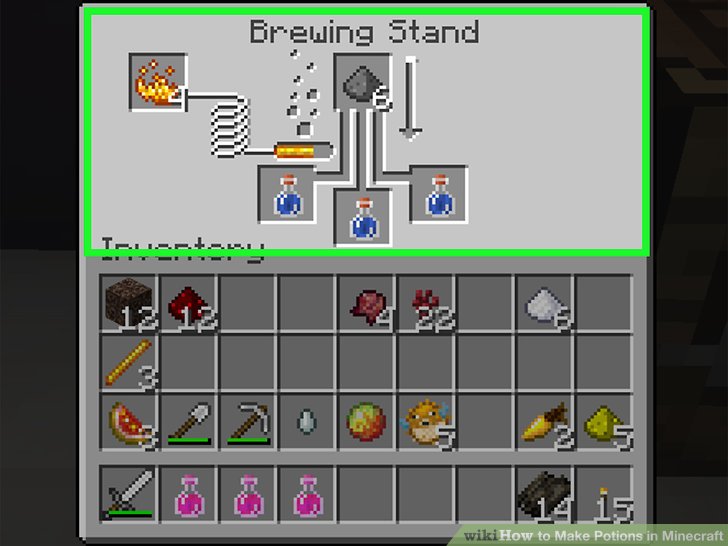
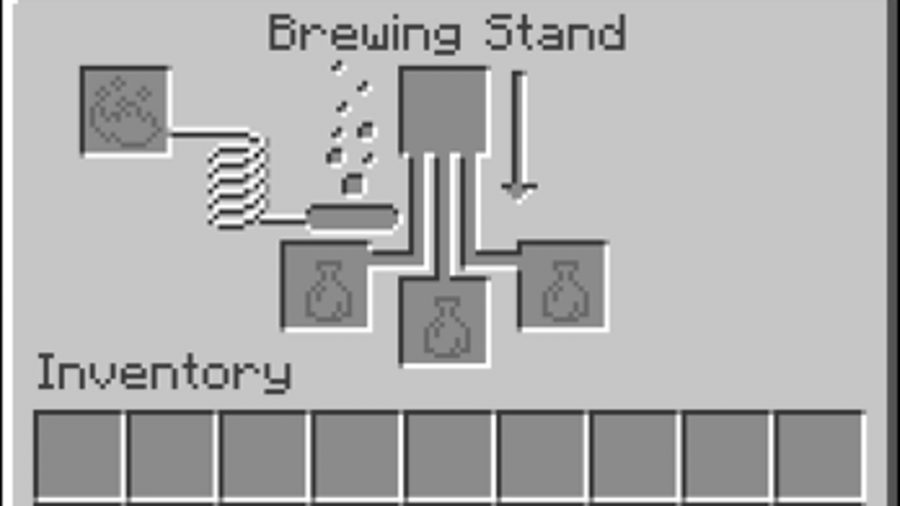
Fill 1-3 glass bottles with water from either a cauldron or a water source
Place the water bottle(s) into the bottom three slots
Fill the top spot with the base ingredient
Use Blaze Powder for the brewing process
Repeat these steps until you have the desired potion
MINECRAFT BREWING INGREDIENTS
BASE
The base ingredients are the first ingredient added to the brewing process. Every potion requires a base ingredient, which determine the potion’s type. The base ingredients are listed below, along with the type of potion each ingredient creates. The modifier effect is when the ingredient is used at the end of the brewing process, to enhance or adapt potions.
Ingredient
Potion type
Modifier effect
Nether Wart
Awkward Potion
None
Redstone Dust
Mundane Potion
Extends potion duration
Glowstone Dust
Thick Potion
Enhances potion potency
Fermented Spider Eye
Potion of Weakness
Corrupts a potion, reversing its effects
Gunpowder
Splash Water Bottle
Explodes on impact
Dragon’s Breath
Lingering Water Bottle
Explodes on impact, leaves a damaging cloud
SECONDARY
The secondary ingredient, also known as the effect ingredient, is to be added to the base one. This ingredient will influence the type of potion created.
Ingredient
Effect
Sugar
Swiftness
Rabbit’s Foot
Swiftness
Glistering Melon
Healing
Pufferfish
Water breathing
Magma Cream
Fire resistance
Golden Carrot
Night vision
Blaze Powder
Strength
Ghast Tear
Regeneration
Turtle Shell
Water breathing
Phantom Membranes
Slow falling
Fermented Spider Eye
Poison
ELEMENT INGREDIENTS
An addition to Minecraft brewing can be found in the Minecraft Bedrock and Education Editions and includes the elemental ingredients below that can cure nausea, weakness, poison, and blindness.
Element
Effect cured
Bismuth
Nausea
Cobalt
Weakness
Silver
Poison
Calcium
Blindness
If you’re excited to venture out from the confines of your mining sanctuary, brewing in Minecraft is a great skill to have. Now you’re familiar with the basics, you can experiment with Minecraft brewing recipes to create potions to suit your combat needs.
Some of the Minecraft potions created from brewing include poison, fire resistance, and healing, but ingredients can be combined and manipulated to create a wide range of potions using Minecraft brewing recipes. But, for now, best of luck on finding the materials you need to help you in your future endeavours.
Earlier this week, prominent streamer Ludvig ‘Anomaly’ Lagerstedt received a 30-day suspension from Twitch after he briefly showed a Minecraft skin depicting Adolph Hitler. Anomaly is appealing the ban – he says it’s “quite excessive” – but the streamer has already gotten into hot water with Twitch over hateful conduct in the past.
In the offending clip, Anomaly opens his Minecraft inventory and immediately closes it as he realises the Hitler skin is on display. “Oh my god, I have the wrong skin on me,” he says, bursting into laughter. On Twitter after the ban, Anomaly said “I had the skin because me and some friends were gonna record a Minecraft video and I was gonna make a little joke about ‘Meinkraft’ and forgot to change back the skin.”
According to the relevant bits of Twitch’s community guidelines, “hateful conduct is any content or activity that promotes, encourages, or facilitates discrimination, denigration, objectification, harassment, or violence” against people in a wide range of categories, and it’s not hard to see how Twitch might recognise Hitler jokes as – at the very least – ‘facilitating denigration.’
It’s not the first time Anomaly has been banned from Twitch for inappropriate conduct, as Dot Esports notes. Over a year ago, he received an indefinite suspension from the platform for violating the hateful conduct rules.
While we never officially got confirmation on why that ban happened – obviously it was eventually overturned – it did come immediately after a clip in which Anomaly dressed a black PUBG character in prison clothes, and followed with the same sort of exaggerated laugh we hear in the Minecraft clip.
Kill time behind the wheel in the wide, wide world of Minecraft.
What you need to know
Minecraft may be on its way to another platform: Tesla cars.
Tesla founder Elon Musk tweeted that the company is working on bringing the blocky game to its vehicles, and it’s a “high priority.”
Musk also revealed that Cuphead will launch in Teslas in August.
Minecraft has already become one of the most ubiquitous games out there, with ports on nearly every platform you can think of. However, you might be able to add another, unconventional platform to that list soon: Tesla vehicles.
Tesla founder Elon Musk recently tweeted that Minecraft is on his company’s list of to-dos for game ports. Going further, Musk says it’s a high priority, alongside Roblox.
Teslas all feature a large displays from which you control much of the car’s functions. Tesla has been gradually adding games to the built-in computers for months now, including Atari titles, Beach Buggy Racing 2, and even chess. Of course, the games are only meant to be played while the car is at rest, so don’t get your hopes up for playing Minecraft as you drive. That’s just plain dangerous.
For those of us without a Tesla, both Cuphead and Minecraft are available to pick up across Xbox One, Windows 10, and a number of other platforms in the meantime.